Understanding your metrics
Written By Rankshift
Rankshift measures your brand’s performance across AI models using several metrics. This guide explains how these metrics work and how we track your brand. Here’s an overview:
Brand metrics
Visibility
Visibility shows what percentage of AI queries mention your brand.
→ Formula: (Number of AI responses mentioning your brand ÷ Total AI responses) × 100
If you run 10 prompts across 5 AI models (50 responses) and your brand appears in 15 responses:
Visibility = (15 ÷ 50) × 100 = 30.0%
This metric appears on:
Average position
Average position shows how your brand performs inside AI answers. It does not only show whether your brand appears. It is the average rank of your brand across every response that mentions it. Responses where your brand is not mentioned do not count.
Position 1 means your brand is the first brand mentioned. A lower number is better. Example: a model lists five brands and yours comes second. That response counts as position 2.
Formula: Sum of your brand's positions ÷ Number of responses mentioning your brand
Example: your brand is mentioned in 3 responses. It is mentioned 1st, 2nd and 3rd.
Average position = (1 + 2 + 3) ÷ 3 = 2.0
Why position matters
Brand authority. A position close to 1 means AI models treat your brand as the most authoritative source for that topic.
Competitive advantage. Brands named first get seen first. A better position means more visibility and an edge over other brands in the answer.
Topic relevance. Position differs per topic. It shows where you are already the reference. It also shows where your content strategy needs work.
This metric appears on:
Share of Voice (SOV)
Share of Voice (SOV) represents the percentage of total brand mentions across all AI-generated responses.
If a brand is mentioned more often than others, it will take up a larger slice in the chart. Mentions are counted individually, even if multiple brands appear in the same response.
The doughnut chart always sums to 100%, showing how your brand compares to competitors in overall AI-driven visibility.
This metric appears on:
Sentiment
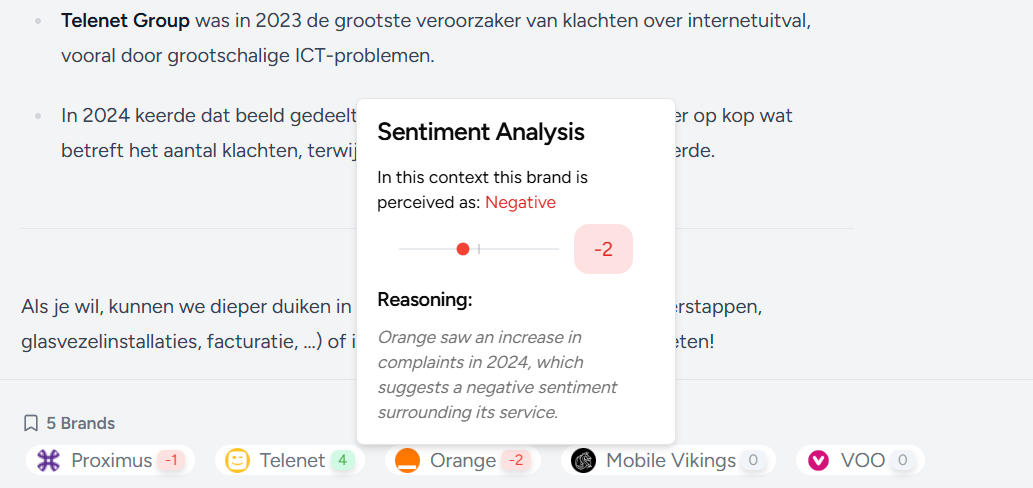
The sentiment score shows the overall tone of a response, rated from -10 to +10. A score of 0 means neutral, anything below 0 is negative, and anything above 0 is positive. Most scores are neutral or positive.
Sometimes, a negative score appears. This usually happens with prompts about customer service, pricing, reviews, or complaints (like in the example below).
Citation metrics
Citations
A citation happens when an AI model uses a web page as a source in its answer. The page is usually shown as a link.
Citations show you which pages and domains AI models trust for your prompts. They also show whether your own website is one of them.
The citation metrics below are a proposal. Please confirm which ones exist in the product:
Total citations: how many times any page was cited.
Citations per domain: how often each domain was cited.
Own-domain citations: how often your own website was cited.
Citation rate: the percentage of AI responses that contain at least one citation. Formula: (Responses with a citation ÷ Total responses) × 100
Example: 50 responses, and 20 of them contain a citation.
Citation rate = (20 ÷ 50) × 100 = 40.0%
Where you find citations:
Dashboard: summary of your most cited domains.
Prompt detail: the citations used for one prompt.
Citations table: the full list of all cited pages and domains.
Was this helpful?
Still need help? Ask the team